Disclosure: Some links on this page are affiliate links. If you buy through them, I earn a small commission at no extra cost to you. I only recommend gear I actually believe in. Thanks for your support! Jason
The Focusrite Scarlett series is the most popular audio interface lineup in the world, and the Solo vs 2i2 debate is one of the most common questions I get. People spend way too long going back and forth on this one. Here’s the honest breakdown so you can stop overthinking it and just order the right one.
Focusrite Scarlett Solo (4th Gen) $119
One XLR input. One instrument input. That’s it. And honestly, that is all most podcasters need. The Scarlett Solo is a dead-simple, rock-solid audio interface that plugs into your computer via USB-C and just works. The preamps are clean, the build quality is excellent, and the latency is low enough that you’ll never notice it.
The 4th Gen version added something called Air mode a high-impedance setting that adds a subtle sparkle and presence boost to your signal. It’s actually pretty nice on dynamic mics like the Rode PodMic or Shure SM48. Flip it on, compare, and decide for yourself. It’s a small but real improvement over the previous generation.
If you’re the only voice on your show one host, one mic. The Solo handles everything you need with zero extra complexity. There’s no reason to spend more. Pair it with a good dynamic mic, set your gain right, and your listeners will never suspect you’re running a budget setup.
View Focusrite Scarlett Solo (4th Gen) on Amazon →
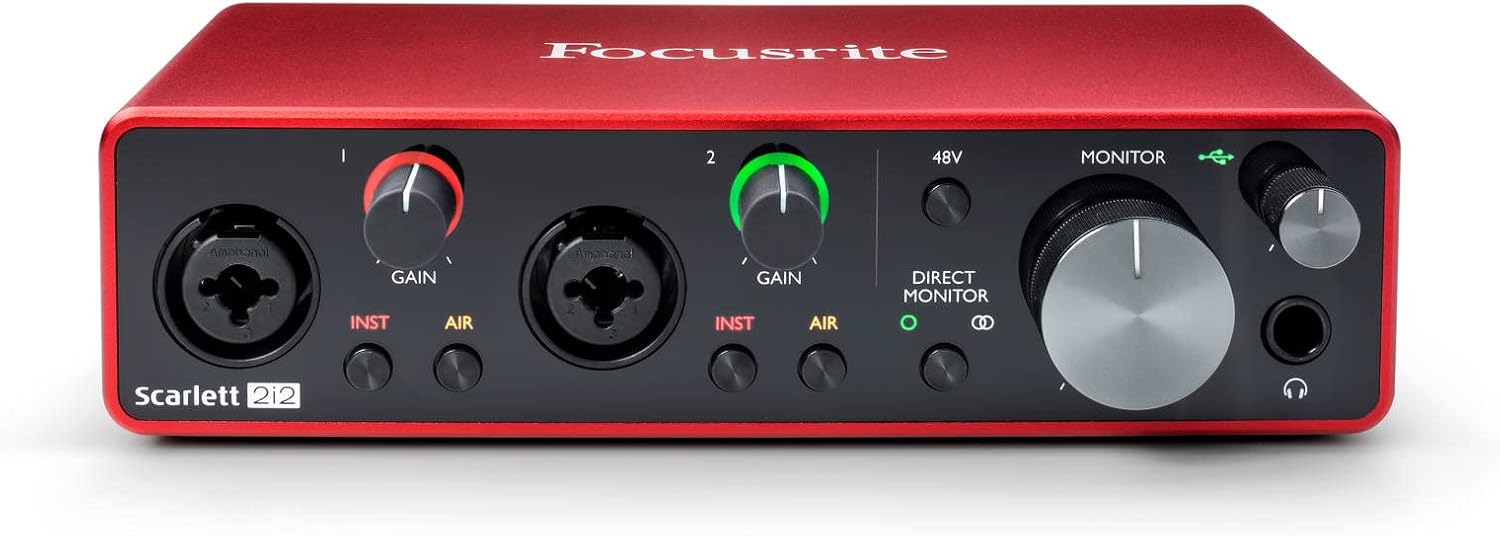
Focusrite Scarlett 2i2 (4th Gen) $179
Two XLR inputs. Same preamp quality as the Solo. Sixty dollars more. If there’s any chance you’ll ever plug two microphones in at the same time: a co-host, an in-person guest, an instrument the 2i2 is the right call. That extra input pays for itself the first time you need it.
The 4th Gen 2i2 also got the Auto Gain feature, which automatically sets your input levels correctly with a single button press. It’s genuinely useful for beginners who aren’t sure what gain staging means. You hold the button, speak into both mics for ten seconds, and it dials in the levels for you. That alone might be worth the $60 upgrade if you’re new to all this.
It also has a built-in “Safe” mode that prevents clipping if you accidentally blast audio into the mic at full volume. Again. These are genuinely useful features, not marketing fluff. The 2i2 is the more capable device, full stop.
View Focusrite Scarlett 2i2 (4th Gen) on Amazon →
Sound Quality Is There Actually a Difference?
The preamps in the Solo and 2i2 are essentially identical. Your recordings will sound the same through both devices at the same settings. The difference is not sound quality. It is capability and features. Don’t let anyone convince you the 2i2 “sounds better.” The circuits are the same. You’re paying for the extra input and the Auto Gain feature, which depending on your situation may or may not matter to you.
Both have enough gain to handle most dynamic mics without a problem. If you’re running an SM7B, you might want a Cloudlifter CL-1 in the chain regardless of which Scarlett you use the SM7B is notoriously gain-hungry and needs that extra clean boost to shine. But for a Rode PodMic, Shure SM48, or Rode Procaster, either Scarlett will drive the mic cleanly without any extra help.
What Comes in the Box
Both the Solo and 2i2 ship with a USB-C cable, a license for Ableton Live Lite (a full DAW), and a 3-month subscription to Splice a sample library. You also get access to a bundle of Pro Tools, Hit Maker Expansion, and Antares Auto-Tune. It’s legitimately a lot of software for the price. You won’t use most of it for podcasting, but knowing it’s there is nice if you ever want to experiment with music production on the side.
Neither unit ships with an XLR cable, so you’ll need to grab one separately. A quality 6ft XLR cable costs about $10 and will last you years. Don’t cheap out on the cable it’s a small investment that protects your signal quality.
Common Mistake: Buying the Solo When You Should Get the 2i2
I see this all the time. Someone buys the Solo because they’re starting solo, then six months later they want to interview a guest in person and they’re stuck with one input. The 2i2 is only $60 more buy it now and you’ll never have to upgrade the interface just to add a second mic.
The flip side is also true. If you’re 100% certain you will never have a co-host in the same room you always record guests remotely over Zoom or Riverside then save the $60 and get the Solo. Remote guests go through your computer’s audio routing, not through a second XLR input. The Solo handles that setup perfectly.
Good Mic Pairings for Either Interface
The Scarlett Solo and 2i2 work great with basically every XLR dynamic mic in the podcasting space. My go-to recommendations at different price points:
- Budget: Shure SM48 ($79) workhorse dynamic, punches way above its price
- Mid-range: Rode PodMic ($99) purpose-built for podcasting, built-in pop filter, sounds incredible
- Premium: Shure SM7B ($399) + Cloudlifter the professional broadcast standard
The Simple Answer
Solo podcaster with no plans to have guests in the same room? Get the Solo. Co-host, in-person guests, or even a tiny bit of uncertainty about your future setup? Get the 2i2. Both are excellent. Both will last you years. The preamps are identical and neither is a wrong answer you’re just buying the right tool for your specific situation.
Don’t overthink it. Buy the one that fits how you’re recording and start making your show. BOOM.
Comments are closed