Disclosure: This post contains affiliate links. If you buy through them, I earn a small commission at no extra cost to you. — Jason
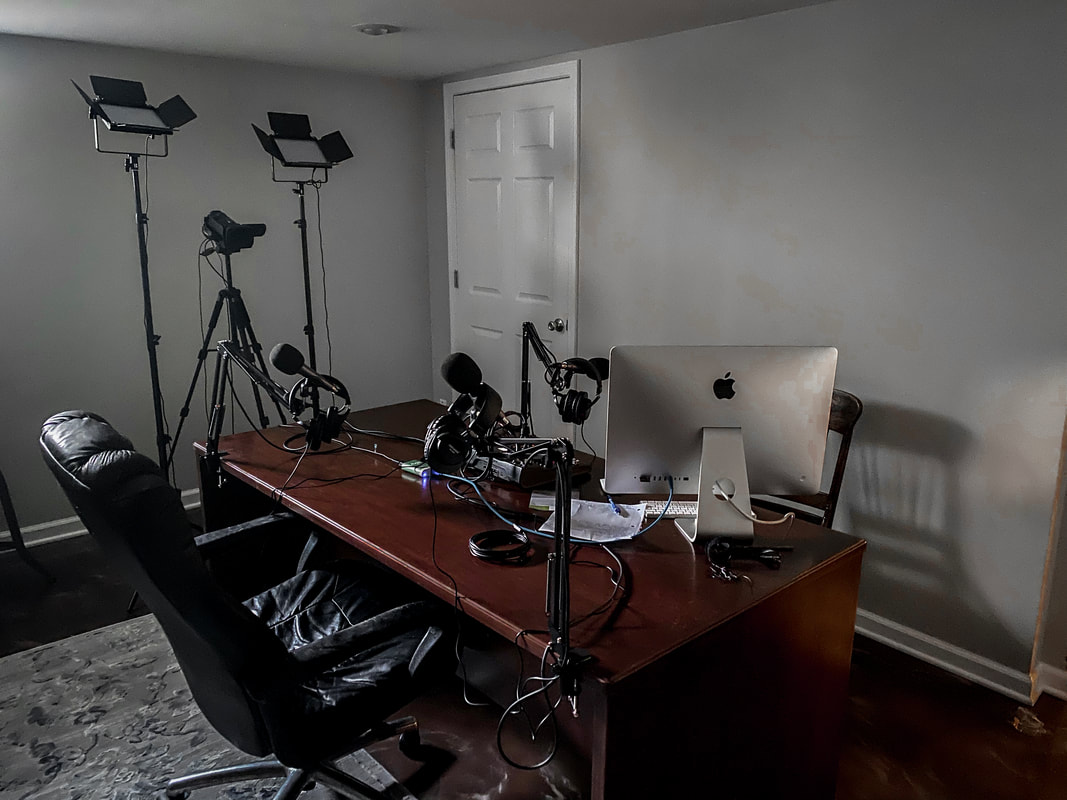
A client came to me with a specific challenge: they needed to record a three-person podcast AND live stream to YouTube at the same time. Same room. Same session. No second take.
Here is exactly how we built it, what we spent, and what I would do differently if I were starting from scratch today.
The Core Problem With Three-Person Setups
Most interfaces are built for one or two people. Add a third host and you run out of channels fast. You also need a way to split the signal: one path goes to your recorder for the clean multitrack file, and another path goes to your streaming software for the live broadcast.
Do that wrong and you end up with a mixed-down stereo feed on your recording. That kills your editing flexibility permanently.
The Mixer: Zoom LiveTrak L-8 (~$299)
The Zoom LiveTrak L-8 is the centerpiece of this build. It gives you eight channels, multitrack recording to SD card, and a dedicated streaming output simultaneously. That dual-output capability is the whole reason this rig works.
Each of the three hosts gets their own channel. You get independent gain control, per-channel EQ, and each track records separately on the SD card. That means in post you can boost one person, cut another, and clean up noise independently. Game changer.
The stream mix goes out via USB to OBS on a laptop. The multitrack recording happens at the same time on SD. Zero compromise between the two.
View Zoom LiveTrak L-8 on Amazon →
Microphones: Sennheiser e835 (3-Pack, ~$75 each)
We used three Sennheiser e835 dynamic microphones. Dynamic mics reject room noise better than condensers, which matters a lot when you have three people talking in a space that was not acoustically treated.
The e835 is a workhorse. It handles loud sources without distorting, it has a tight cardioid pattern that ignores what is behind it, and it sounds warm and present on voice. At $75 each, you get professional broadcast quality without the broadcast price tag.
Pair each one with a boom arm and you are set. We used the Rode PSA1 boom arms — solid, quiet, and they hold position without drifting.
View Sennheiser e835 on Amazon →
Video: Canon XA11 Camcorder (~$1,299)
For a professional livestream, you need more than a webcam. The Canon XA11 is a compact professional camcorder that outputs clean HDMI. That is the key word: clean. No overlays, no battery indicator, no autofocus box cluttering your stream frame.
It has a 20x optical zoom, built-in ND filters, and dual SD card slots. Overkill for a podcast? Maybe. But when your client is also using this footage for marketing content and client videos, the image quality matters. The XA11 delivers broadcast-grade video in a package that is not the size of a film camera.
Capture Card: AV.io HD (~$399)
To get the XA11 into OBS, you need a capture card. The Epiphan AV.io HD is the one I recommend for professional setups. It is plug and play, it does not require drivers, and it outputs a rock-solid 1080p30 signal with zero dropped frames.
Some cheaper capture cards introduce lag or color shift. The AV.io does neither. Once you plug it in, OBS sees it as a standard webcam source. Done.
View Epiphan AV.io HD on Amazon →
The Full Signal Chain
Three mics into the L-8. L-8 records multitrack to SD card continuously. L-8 USB output goes to OBS on the laptop. Canon XA11 HDMI out goes into the AV.io HD capture card, which plugs into the same laptop via USB. OBS takes both audio and video and pushes the stream to YouTube.
After the session: pull the SD card, import the multitrack into your DAW, edit each voice independently, export the final mix. Clean. Professional. Exactly what a polished podcast sounds like.
What I Would Do Differently
If budget was tighter, I would swap the Canon XA11 for a Sony ZV-E10 with a clean HDMI output — significantly cheaper with excellent image quality. But for clients who need that footage for marketing too, the XA11 is worth the price.
I would also add a simple acoustic panel kit behind the hosts. Room treatment makes a bigger difference than any microphone upgrade once you are past the entry level.
BOOM. Three hosts, one room, live stream plus multitrack recording. This setup handles all of it without compromise.
— Jason
Comments are closed