Disclosure: Some links on this page are affiliate links. If you buy through them, I earn a small commission at no extra cost to you. I only recommend gear I actually believe in. Thanks for your support! — Jason
Teachers, professors, and online course creators have something most podcasters don’t: real expertise and a built-in audience that already wants to learn from you. The gear just needs to match the quality of what you’re teaching. Here’s how to set that up without overcomplicating it.
Why Audio Quality Matters Extra for Educators
Your students and audience are already used to watching high-production YouTube videos and listening to polished podcasts. When they hit friction from bad audio — distortion, echo, background hum — they either stop listening or they start questioning whether the content is worth their time. That’s not a reflection on your expertise. It’s just human psychology.
The good news is that great audio is genuinely cheap now. For under $300 you can sound as professional as a university lecture or a premium online course. There’s no excuse for bad audio when the solution is this accessible.
The Educator Podcast Setup ($250 to $350)
This is what I’d put together for a teacher or professor recording from a home office, classroom office, or wherever you get quiet time between classes.
The Rode PodMic ($99) is the right mic for this use case. Dynamic, cardioid, warm broadcast sound. It rejects background noise from HVAC, open windows, and the general ambient hum of a school environment. Record in your office with the door closed and this mic handles the rest.
Rode PodMic — $99 — View on Amazon →
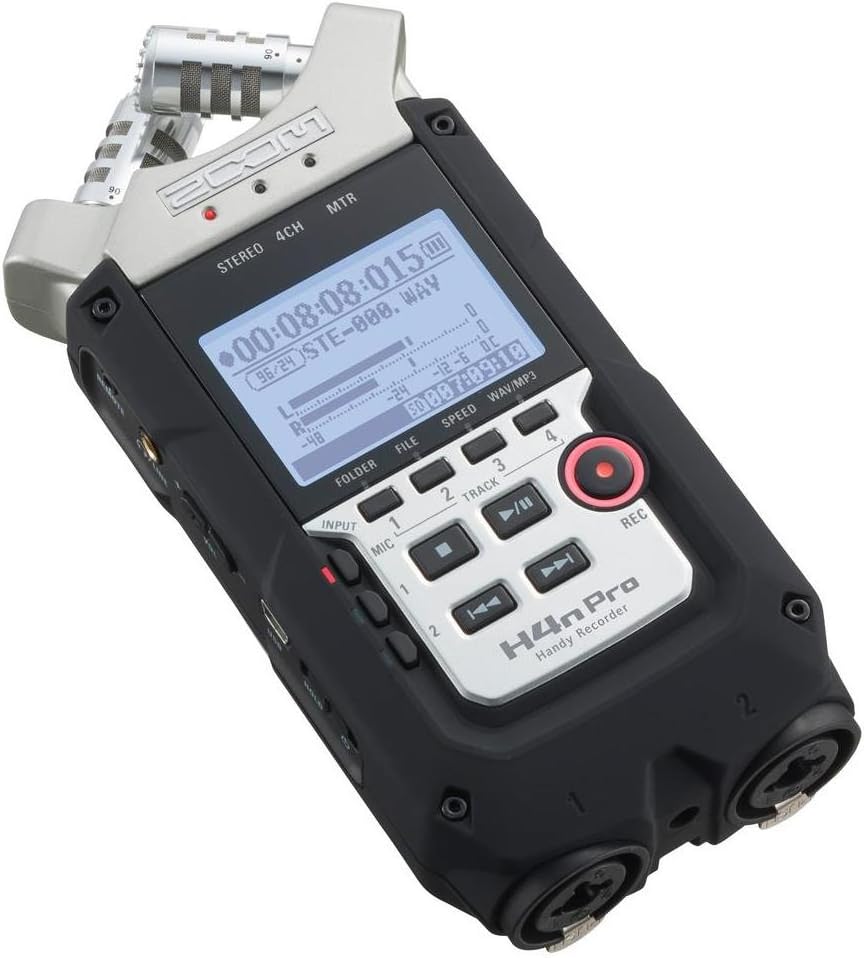
The Zoom H4n Pro ($149) is the recorder I recommend for educators specifically because it doesn’t require a computer during recording. You plug in your mic, insert an SD card, and hit record. At the end of the day, transfer the files to your laptop for editing. That workflow fits naturally into a busy teaching schedule — record when you have time, edit when you have time, they don’t have to happen simultaneously.
Zoom H4n Pro — $149 — View on Amazon →
Add an Elgato Wave Arm ($79) to keep the mic positioned correctly and off your desk surface. This eliminates keyboard and desk vibration from your recordings and makes the setup ergonomically comfortable for long recording sessions.
For Classroom or Group Recordings
Recording panel discussions, student roundtables, or seminar-style conversations? Step up to the Zoom H6 ($349). It handles up to four microphones simultaneously on individual channels. Each person gets their own track, which makes post-production editing dramatically cleaner — you can adjust each voice independently and cut out cross-talk from any channel.
Four Rode PodMics ($99 each) plus the Zoom H6 ($349) gives you a complete four-person classroom podcast setup for around $745. That’s a professional multi-voice recording studio that fits in a bag.
Recording Online Courses vs. Podcasts
If your primary output is an online course rather than a podcast, the same gear works perfectly. The difference is workflow: course recordings tend to be shorter, more scripted segments rather than long conversations. The H4n and PodMic combination handles both use cases with no changes to the setup.
One educator-specific tip: record in a carpeted room with a closed door. Classrooms and school offices often have hard floors and bare walls that create noticeable echo. A carpeted home office or a room with furniture and soft surfaces makes a real difference in room sound without spending a dollar on acoustic treatment.
The Complete Educator Setup
Rode PodMic + Zoom H4n Pro + Elgato Wave Arm + Senal SMH-500 Headphones = approximately $375 total. That’s everything you need for professional-quality podcast and course recordings that match the quality of your teaching content.
Your students deserve to hear your expertise clearly. This setup makes sure they can. BOOM.
Comments are closed