Disclosure: Some links on this page are affiliate links. If you buy through them, I earn a small commission at no extra cost to you. I only recommend gear I actually believe in. Thanks for your support! — Jason
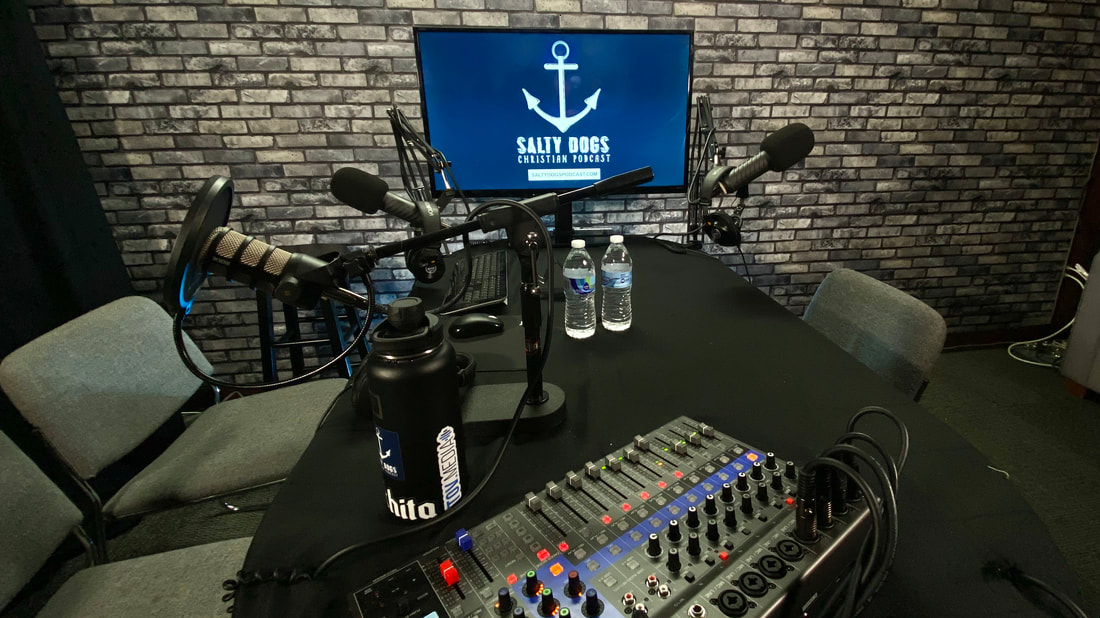
I’ve run a four-person podcast that also broadcasts live on Facebook since the early days of the Salty Dogs Podcast. Four mics, four hosts, simultaneous live streaming, and the occasional remote guest via Zoom. Here’s what I’ve learned about making that kind of setup work reliably, week after week.
The Challenge of Four Mics Plus Live Streaming
Recording four people in the same room is one thing. Recording four people and simultaneously sending a clean audio feed to a live stream while also recording individual tracks for post-production is a different level of complexity. You need a mixer or recorder that handles all of those output paths at once without sacrificing audio quality on any of them.
The other challenge is consistency. When you’re going live, there are no retakes. If audio goes wrong in the middle of a live stream, it goes wrong in front of your audience. The gear needs to be reliable, the setup needs to be simple enough to run every week without issues, and every person at the table needs to have their own dedicated microphone.
Our Gear List
Zoom LiveTrak L-12 — This is the mixer and recorder at the center of the setup. 12 channels, USB audio interface to the computer for live streaming, SD card recording for individual tracks, and a headphone mix for each performer. It handles the routing from four XLR inputs simultaneously to both the recording and the live stream without any signal compromise. This is the gear that makes the whole thing work.
2x Rode Procaster — Broadcast-quality dynamic mics. The Procaster is a step up from the PodMic — tighter pattern, more presence, built for serious podcast production. These go to the two primary hosts who do the most talking.
1x Rode PodMic — Third host position. Same excellent sound quality as the Procaster at a lower price point. Works seamlessly alongside the Procasters in the same setup.
1x Sennheiser e835 — Fourth seat, used for guest positions or rotating hosts. Excellent dynamic mic with a slightly more open sound character. Holds its own alongside the Rode mics without any noticeable quality difference in the final mix.
Senal SMH-500 Headphones — One pair per person at the table. Everyone monitors their own audio live. This is essential for live streaming — hosts can hear the mix, catch problems immediately, and stay consistent throughout the session.
How the Live Streaming Works
The Zoom L-12 connects to the computer via USB and appears as an audio interface in OBS or any live streaming software. The mixed stereo output from the L-12 feeds into the streaming software alongside the video from the camera. So you’re getting a live, mixed audio feed from four microphones into the stream — no separate audio interface required, no extra routing complexity.
Simultaneously, the L-12 records each mic to its own track on the SD card. So at the end of a live session, we pull the SD card and have four isolated audio tracks for clean post-production editing on the podcast episode. The live stream and the edited podcast both come out of the same single recording session with no compromises on either end.
Adding a Remote Guest
When we bring in a remote guest via Zoom, their audio feeds into the L-12 through a dedicated return channel. The remote guest hears everyone at the table through their computer speakers, and we hear them through our headphones in the mix. It requires a mix-minus configuration — sending the L-12 output to Zoom without including the return channel, to avoid feedback loops — but once it’s set up, it runs cleanly every week without adjustment.
What I’d Tell Someone Building This Setup from Scratch
Start with the Zoom H6 and four Rode PodMics if you’re just doing a four-person in-room podcast without live streaming. That’s the simpler, cheaper path. Step up to the Zoom LiveTrak L-12 when live streaming is a real requirement — the L-12 is built for exactly that use case and handles it better than anything else at its price point.
Get everyone their own headphones. Don’t share or skip the headphones for a live streaming setup. The ability to hear the mix live is the difference between catching a problem before it reaches your audience and finding out about it in the comments after the fact. BOOM.
Comments are closed