Disclosure: Some links on this page are affiliate links. If you buy through them, I earn a small commission at no extra cost to you. I only recommend gear I actually believe in. Thanks for your support! — Jason
Whether you’re presenting to a team of 10 or a webinar audience of 1,000, how you look and sound on screen matters more than most people realize. Remote work has made video calls a permanent part of professional life, and the people who invest in their setup stand out immediately. Here are three practical upgrades that make a real difference.
Way #1: Upgrade Your Microphone
This is the single most impactful upgrade you can make. The built-in laptop microphone picks up every keystroke, every room echo, and every background noise within 10 feet. Even your most engaged audience members will mentally disengage when the audio is hard to listen to — it creates fatigue and makes your content feel less authoritative.
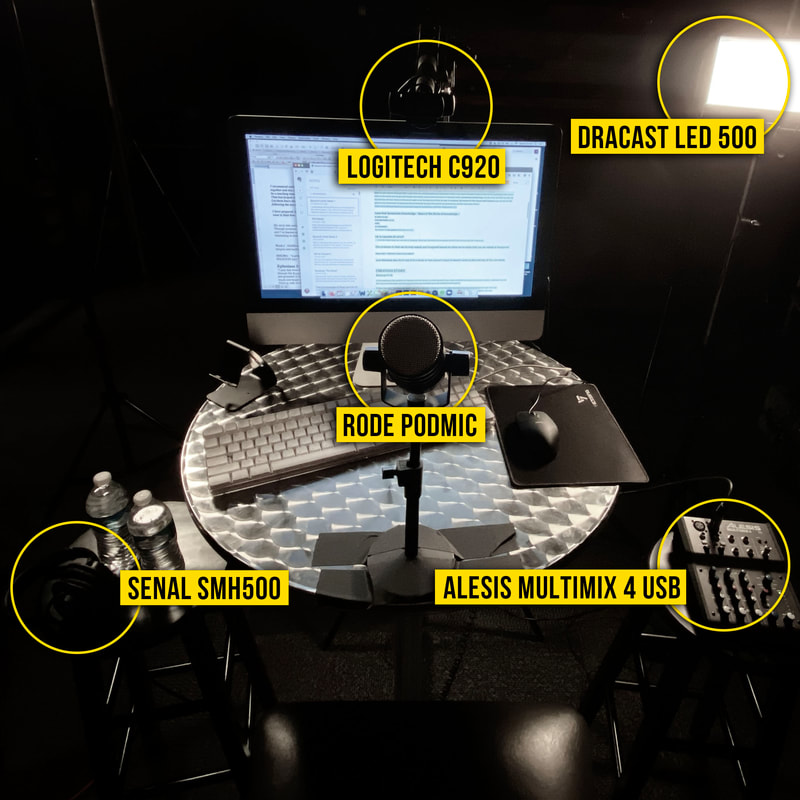
A dedicated dynamic microphone changes this completely. The Rode PodMic ($99) is the one I recommend most. Dynamic, cardioid, built-in pop filter. It rejects background noise from your office environment and focuses on your voice. Position it 6 to 8 inches from your mouth on a boom arm and you’ll sound like you’re in a broadcast studio compared to the laptop mic.
You’ll need an audio interface to connect it. The Focusrite Scarlett Solo ($119) is the cleanest desktop solution — sits next to your monitor, USB-C to your computer, and is always ready. Alternatively, a quality USB microphone is a simpler option if you want true plug-and-play without an interface.
Rode PodMic — $99 — View on Amazon →
Focusrite Scarlett Solo — $119 — View on Amazon →
Way #2: Improve Your Lighting
Camera technology can only do so much with poor lighting. A dark room, a window behind you, or overhead lighting casting shadows on your face all make you look unprofessional on camera regardless of how nice your setup otherwise is.
The fix is a key light — a dedicated light source positioned in front of you at eye level, roughly 45 degrees to one side. This fills in shadows, improves skin tone rendering on camera, and creates the kind of lit appearance that signals you know what you’re doing.
A simple LED ring light or panel light in the $40 to $80 range solves this completely. Position it facing you, at or slightly above eye level, and you’ll see an immediate transformation in how you appear on camera. This is often a more visible upgrade than the camera itself.
One additional tip: if you have a window in your space, sit facing it instead of with it behind you. Natural front lighting is completely free and often better than artificial lighting. Move your desk or your camera angle to take advantage of it.
Way #3: Upgrade Your Camera
Laptop webcams have improved significantly, but a dedicated external webcam or camera still produces noticeably better image quality — wider aperture for a more pleasing background separation, better low-light performance, and a more natural field of view for presentations.
The Logitech C920 ($69) and C922 ($79) are the workhorses of the webcam world — reliable, 1080p at 30fps, and compatible with every platform and recording software. For most presenters this is the sweet spot of quality and cost.
If you want to go further, a mirrorless camera or DSLR with a capture card produces genuinely cinematic image quality — a large sensor, interchangeable lenses, and the shallow depth of field look that separates serious video from everyone else. The Elgato Cam Link 4K ($130) connects most HDMI cameras to your computer as a webcam input. Pair it with any Sony or Canon mirrorless and you’ll look exceptional on any call.
The Sequence That Makes Sense
If you’re upgrading from scratch, do it in this order: microphone first, lighting second, camera third. Audio quality affects every single person listening. Lighting affects how you look. Camera quality is the final polish. You’ll get the most return on investment by addressing them in that sequence rather than jumping straight to a new camera.
The complete upgraded Zoom setup — dedicated mic, interface, key light, and external webcam — runs under $400 total and completely transforms how you present to a remote audience. BOOM.
Comments are closed