Disclosure: Some links on this page are affiliate links. If you buy through them, I earn a small commission at no extra cost to you. I only recommend gear I actually believe in. Thanks for your support! — Jason
Conferences, client sites, hotel rooms, co-working spaces — if your podcast travels with you, your gear needs to be portable without sacrificing audio quality. Here’s the mobile setup I trust and have used in the field more times than I can count.
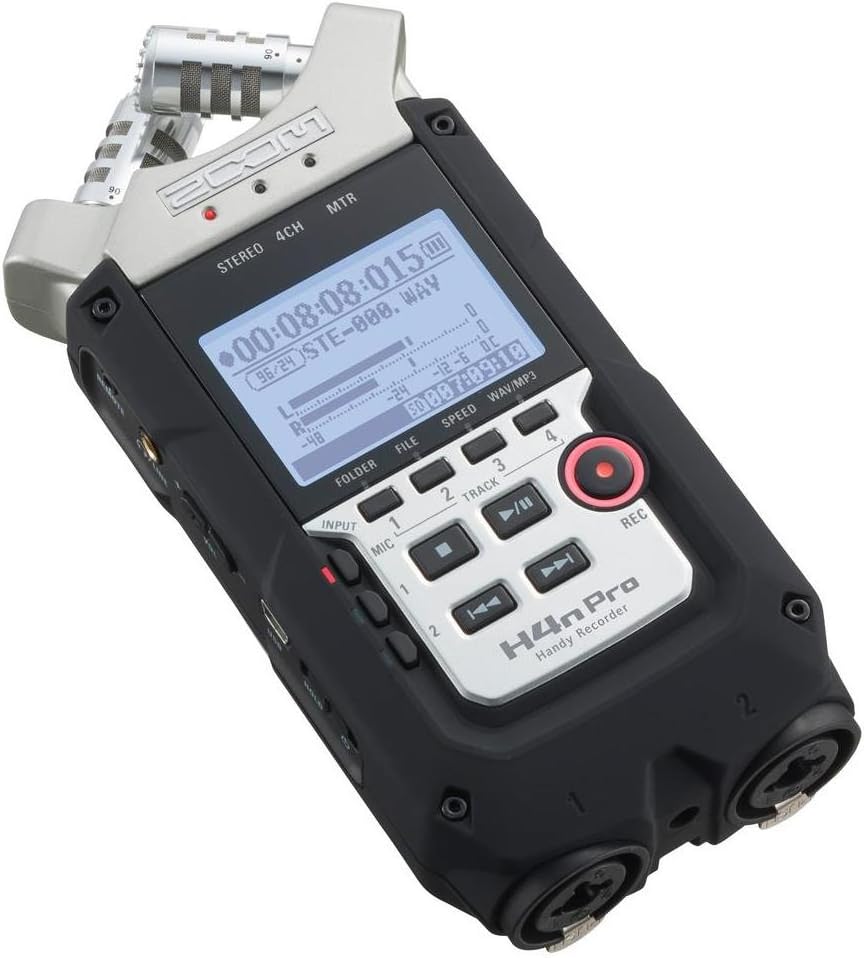
The Core: Zoom H4n Pro — $149
The Zoom H4n Pro is the ultimate travel recorder. It fits in a jacket pocket, runs on two AA batteries for hours, has two XLR inputs for one or two mics, and records broadcast-quality audio directly to an SD card. No laptop required. No power outlet required. No software to configure. You hit record and it works.
I’ve taken this recorder on trips too many times to count — conferences, church events, client visits, travel recording sessions. It’s never let me down in the field and it’s the first thing I recommend to anyone who needs to record away from a permanent studio setup.
Zoom H4n Pro — $149 — View on Amazon →
The Mic: Rode PodMic or Shure SM48
For a travel setup, you want a dynamic mic that’s compact and durable. The Rode PodMic ($99) is my first choice — warm sound, great noise rejection, built-in pop filter, and small enough to pack easily.
If you’re particularly worried about durability — the kind of podcast journalist or field recorder who puts gear through real stress — consider the Shure SM48 ($99) instead. Shure dynamic mics are famously tough. The SM48 can take drops and rough handling that would worry you with more delicate gear, and it still sounds excellent.
Rode PodMic — $99 — View on Amazon →
Shure SM48 — $99 — View on Amazon →
Complete Travel Kit
Zoom H4n Pro + Rode PodMic + 3ft XLR cable + SD card (64GB) + 4x AA batteries. Everything fits in a small camera bag or the accessory pocket of a laptop bag. Total weight under 2 lbs. Total cost under $275. That’s a professional mobile podcast studio.
For the XLR cable, a short 3-foot cable is all you need for travel recording — it keeps the kit compact without the cable coiling everywhere. Save the 10-foot cables for your permanent home setup.
Hotel Room Recording
Hotel rooms are actually surprisingly workable recording environments once you deal with three specific problems. First, hang the bedding comforter or a spare blanket over the wall behind your mic position. The fabric absorbs reflections from the flat wall and kills the echo that makes hotel room recordings sound hollow.
Second, turn off the HVAC while recording. Hotel HVAC systems create a constant low-frequency hum that the mic will pick up. Turn it off, record your session, turn it back on when you’re done.
Third, speak close to the mic — 6 to 8 inches. Close mic placement naturally reduces room sound relative to your voice. The closer you are, the less the room matters. BOOM.
Conference and Event Recording
For recording interviews at conferences or events, the H4n’s portability is ideal. Approach a speaker after a session, pull out the H4n and mic, ask if you can record a quick conversation, and you’re rolling in 30 seconds. No setup overhead, no tech to troubleshoot on the fly.
Keep a spare SD card and spare batteries in your bag at all times. Running out of storage or power mid-interview at a conference is the kind of mistake you only make once. Pack the spares every time.
Transferring Files on the Road
When you’re done recording, transfer files from the SD card to your laptop for editing. A small SD card reader that stays permanently in your laptop bag makes this seamless. Alternatively, the H4n connects via USB and appears as a drive on your computer — plug and drag the files over.
Some podcasters do a quick rough edit on the road and ship the file to an editor remotely. Others batch the travel recordings and edit when they get back. Either workflow is easy with this setup.
Comments are closed