Disclosure: Some links on this page are affiliate links. If you buy through them, I earn a small commission at no extra cost to you. I only recommend gear I actually believe in. Thanks for your support! — Jason
Working from home has turned millions of people into accidental audio engineers. If you’re recording a podcast from a home office, you’re dealing with real challenges: parallel walls, hard surfaces, a neighbor’s lawn mower, HVAC that kicks on mid-sentence. Here’s what actually works.
The Home Office Problem
Most home offices weren’t designed with recording in mind. Hard desks, bare floors, flat walls — they all create reflections that make your voice sound thin, echoey, and unprofessional. The instinct is to treat the room with foam panels, but that’s actually the second step. The first step is choosing the right microphone type.
A dynamic cardioid microphone rejects off-axis sound naturally. It focuses on what’s directly in front of it and ignores reflections, background noise, and most of what the room is doing. Get the right mic and your home office transforms into a perfectly functional recording space without spending a dollar on acoustic treatment.
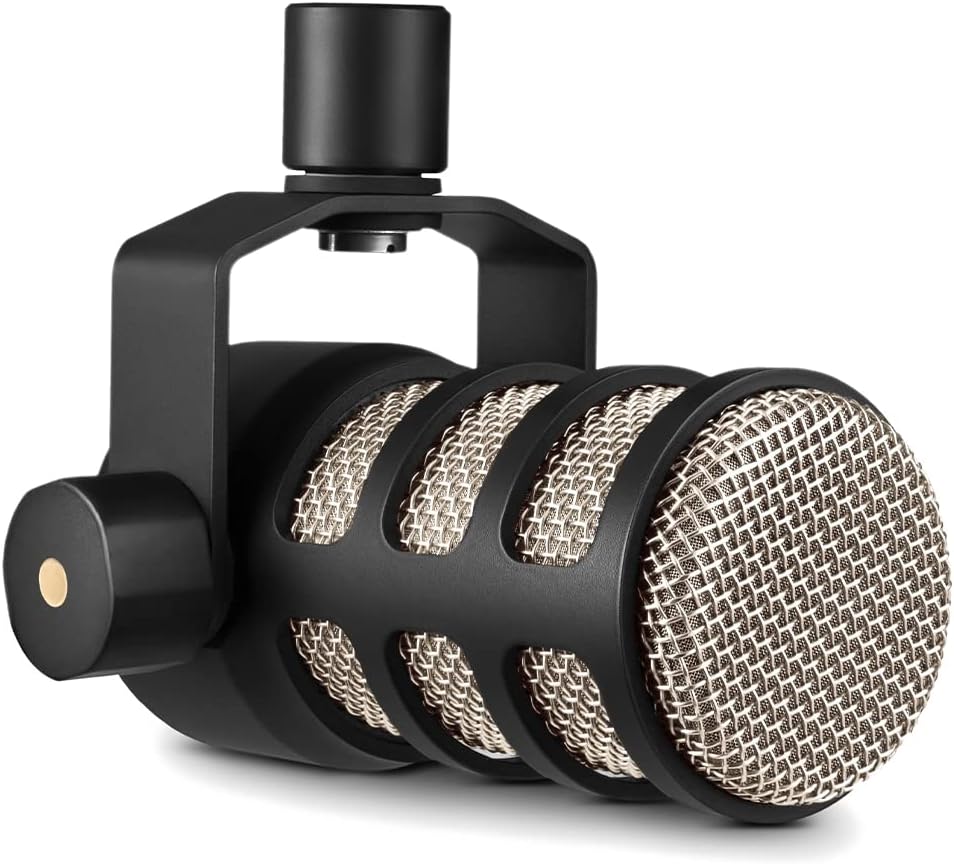
Best Overall: Rode PodMic — $99
The Rode PodMic is the mic I recommend to every home office podcaster. Dynamic, cardioid, with a built-in pop filter and internal shock mount. It was designed from the ground up for podcasting, and that shows in how it performs in real-world recording environments.
Set it up 6 to 8 inches from your mouth on a boom arm, and the home office background disappears. HVAC hum, street noise, keyboard clicks — the PodMic’s tight pickup pattern ignores all of it. Warm, broadcast-ready sound without any acoustic treatment required.
Rode PodMic — $99 — View on Amazon →
Best for Noisy Environments: Shure SM48 — $99
If your home office is particularly noisy — kids in the next room, street traffic, thin walls — the Shure SM48 is worth considering alongside the PodMic. The SM48’s pickup pattern is extremely tight, making it one of the best noise-rejecting dynamics at any price. It’s been used in loud live music environments for decades precisely because it focuses so precisely on what’s directly in front of it.
Sound character is slightly brighter than the PodMic, which some people prefer. Either one will serve you well in a home office — try samples of both and go with the sound you like more.
Shure SM48 — $99 — View on Amazon →
Best Premium: Shure SM7B — $399
If you want the absolute best noise rejection available, and you’re using your setup for podcast recording, LinkedIn video, YouTube content, and Zoom calls all from the same desk, the SM7B is your mic. It’s legendary for good reason. Its built-in air suspension shock isolation, internal pop filter, and remarkably tight cardioid pattern make it almost immune to room noise at close proximity.
The SM7B is the mic you see behind the biggest names in podcasting. Used in broadcast studios for 50 years. If the home office background noise problem is something you want solved permanently and completely, the SM7B solves it. Pair it with a Focusrite Scarlett Solo and a Cloudlifter for the complete setup.
Shure SM7B — $399 — View on Amazon →
Interface or Recorder?
All three of these are XLR mics, so you need something to connect them to your computer. For a home office setup, the Focusrite Scarlett Solo ($119) is the cleanest solution. It sits on your desk, plugs into your computer via USB-C, and gives you one XLR input with excellent preamps. Simple, professional, and stays on your desk ready to go every time.
If you want the option to record without a computer, the Zoom H4n Pro ($149) is the alternative. Records to an SD card, battery-powered, and doubles as a portable recorder if you ever need to record on the road.
Focusrite Scarlett Solo — $119 — View on Amazon →
Don’t Forget the Boom Arm
Whatever mic you choose, get it off your desk. A boom arm positions the mic correctly at close range, eliminates desk vibration from your recording, and keeps your workspace clean. The Elgato Wave Arm ($79) is my favorite for home office setups — low profile, built-in cable management, and looks great if you’re on camera too. It’s a $79 upgrade that makes a noticeable difference in both audio quality and desk ergonomics.
Comments are closed